ネットワーク系を主にやる私であっても、最近GitHubやらWSL2など開発の環境を使う頻度が増えてきました。
今回はそんな中の小ネタ。「WSL2で同じディストリビューションで複数の環境を構築する話。」を小ネタとして書いていきます。
そもそも何がやりたい
例えば下記の用途でWSLを使いたかったりする。
- Ubuntu環境(汎用)
- Ubuntu環境(Docker用)
- Ubuntu環境(VSCode用)
しかしながらデフォルトの方法だと同じディストリビューションだとインストールができない。
1
2
3
4
5
6
7
8
| PS C:\WINDOWS\system32> wsl --list -v
NAME STATE VERSION
* Ubuntu Stopped 2
Ubuntu-24.04 Running 2
PS C:\WINDOWS\system32> wsl --install -d Ubuntu-24.04
指定された名前のディストリビューションは既に存在します。--name を使用して別の名前を選択してください。
エラー コード: Wsl/InstallDistro/ERROR_ALREADY_EXISTS
PS C:\WINDOWS\system32>
|
対処法。
書いてある通りだけれども、--nameを使うことでこの問題を回避できる。
webを検索しても結構な確率でexportからのimportという結構面倒くさい方法を使っている例が多かったので今回メモ書きとして残しておく。
構文
``wsl –install -d <distribution_name> –name <unique_name>
実際にやってみると下記の感じ。
ディストリビューションの名前とかWSLの名前は適宜読み替えてください。
1
2
3
4
5
6
| PS C:\WINDOWS\system32> wsl --install -d Ubuntu-24.04 --name Ubuntu_VSCode
ダウンロードしています: Ubuntu 24.04 LTS
インストールしています: Ubuntu 24.04 LTS
ディストリビューションが正常にインストールされました。'wsl.exe -d Ubuntu_VSCode' を使用して起動できます
Ubuntu_VSCode を起動しています...
Provisioning the new WSL instance Ubuntu_VSCode
|
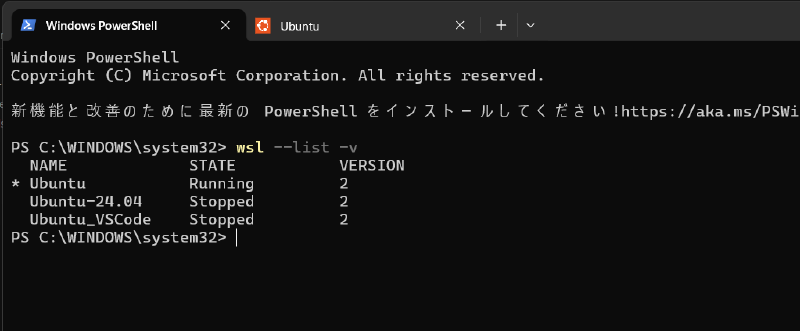
インストール後はこんな感じになる。ここまで来てしまえば、あとは目的のWSLをスタートするだけで簡単に複数の環境を分けることができる。
1
2
3
4
5
6
| PS C:\WINDOWS\system32> wsl --list -v --all
NAME STATE VERSION
* Ubuntu Stopped 2
Ubuntu-24.04 Stopped 2
Ubuntu_VSCode Stopped 2
PS C:\WINDOWS\system32>
|
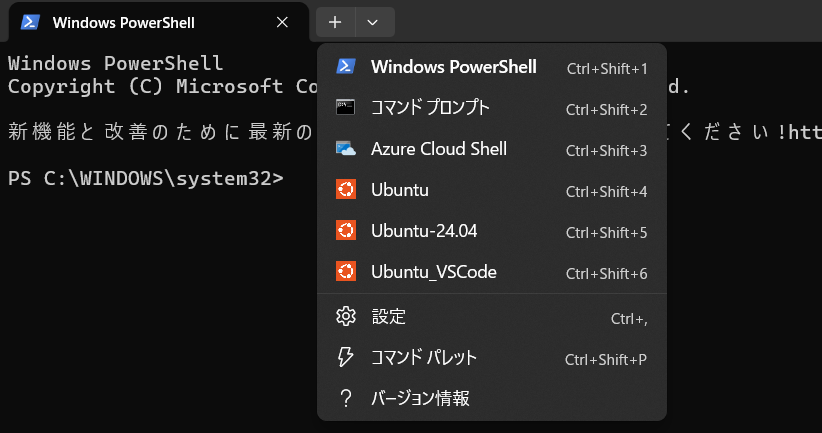
インストール後はWindows Terminalからも選択ができるようになる。ここから起動するのが一番手っ取り早いと個人的には思う。
出典など。
公式情報はこちら。2024年ごろから使えるらしいので、結構古いネタではあるが、そこまでしられてないのかな?
1
2
3
4
5
6
7
8
| What benefits will end users for WSL get?
This new architecture will add some new requested features for WSL users as well. Specifically, you’ll be able to:
More easily automate WSL distro set up as an end user by being able to run commands before user creation and set up
Get clearer error messages (this will be thanks to consolidations in the architecture for where errors get shown)
Set the WSL distro name and install location with wsl --install options --name and --location (Now you can install straight to your other hard drives!)
More potential improvements in the future!
|
まとめ。
だいぶ久しぶりのブログ更新となってしまいました、、、
この記事を書こうと思ったのは、テキストベースで書けるからですね。(おい)
画像が多いと、画像の配信だったりリサイズだったり取得がどうにも面倒くさくなってしまって、、、
また気が向いたときに備忘録がてらに書いていきましょうか。